
Managed Cybersecurity
Vendor Access Cleanup for Loveland Businesses
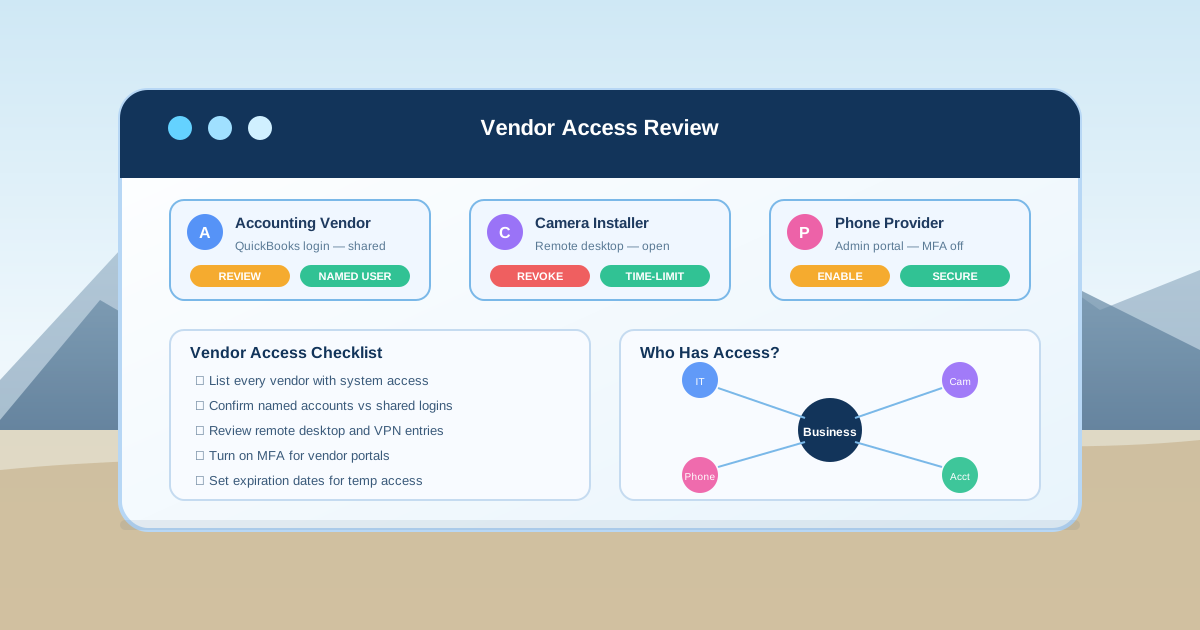
Most Loveland businesses work with outside vendors every day. An accounting firm logs into QuickBooks, a camera installer has remote access to the network, a phone provider manages the cloud portal, a copier technician knows the admin password, and a software consultant still has access to Microsoft 365 or Google Workspace from a project two years ago. Each connection was set up for a good reason. The problem is that hardly anyone goes back to review whether that access still makes sense.
By RightCyber Solutions · 2026-07-24
Quick takeaways
- Vendor accounts often stay active long after the project ends, creating quiet paths into business systems
- Shared passwords, open remote desktop connections, and unprotected admin portals are common cleanup targets
- Microsoft 365 or Google Workspace should be reviewed for third-party app permissions and former vendor access
- RightCyber helps Loveland and Larimer County businesses document and close vendor access gaps without disrupting daily work
Vendor access grows quietly during normal operations
A Loveland business does not usually plan to accumulate vendor access. It happens one request at a time. The copier technician needs a login to configure scan-to-email. The phone provider needs admin access to set up call routing. A bookkeeper gets shared access to the accounting system. A marketing consultant connects a third-party tool to the company Microsoft 365 or Google Workspace. Each step is reasonable in the moment, but the combined picture can become a tangle of connections that no one is watching.
The issue is not that vendors are untrustworthy. The issue is that access outlives the relationship. A vendor technician leaves their company. A shared password circulates through email. A remote desktop port stays open for convenience. A third-party app keeps reading company data months after the project wrapped up. Those leftover connections are exactly what an attacker or a disgruntled former vendor contact can exploit.
A vendor access cleanup is about bringing those connections back into view. The business should know who can reach what, why they have that access, and when it should end.
Start by listing every vendor that touches your systems
The first step is building a vendor inventory. That sounds formal, but it can start with a simple list. Who has logged into your network, cloud accounts, phone system, camera system, accounting software, website, firewall, or backup platform in the past year? Which vendors have physical access to your server closet or network equipment? Which consultants or contractors have been given credentials of any kind?
For Loveland businesses, the list often includes internet and phone providers, accounting software vendors, copier or printer service companies, security camera installers, HVAC vendors with smart thermostat access, website developers, marketing agencies, payroll providers, and specialized industry software vendors. Each one may have a different level of access, and each one should be reviewed.
Once the list exists, the business can decide which vendors still need access, which ones should have reduced access, and which ones should be removed entirely. That single exercise often surfaces at least one connection that surprises the owner.
Shared passwords are a cleanup priority
Many small businesses still use shared passwords for vendor portals, software logins, and admin accounts. The copier vendor knows the password. The bookkeeper knows the password. The office manager knows the password. When someone leaves or the vendor relationship changes, the password does not get changed because it would disrupt access for everyone else.
That creates a slow security problem. A shared password can travel through text messages, sticky notes, browser autofill entries, and personal email. Over time, too many people know it, and no one is sure who has it. If the business needs to lock access quickly, changing one password creates chaos across multiple systems.
A better approach moves vendors to named accounts wherever possible. If a platform supports individual logins, each vendor gets their own credentials. If shared access is unavoidable, the business should document who knows the password, when it was last changed, and what happens when a vendor relationship ends. A password manager can make this much easier to maintain.
Remote access should be named, limited, and time-bound
Remote desktop, VPN connections, screen-sharing tools, and vendor support portals are some of the most common entry points for trouble. A vendor may have been given remote access for a specific project, but that access can linger for months or years after the work is done. If the connection is unprotected or uses a shared credential, the risk grows further.
A cleanup should identify every remote access path into the business. Who can connect remotely? What systems can they reach? Is multifactor authentication required? Is the connection logged? Does the vendor still need access, or was it left open because no one remembered to close it?
For vendors that need ongoing access, the business should require named users, MFA, and a documented reason. For vendors that only need temporary access, the cleanup should set an expiration date and remove the connection when the project ends. RightCyber can help Loveland businesses review remote access as part of managed cybersecurity support.
Check what third-party apps can see in Microsoft 365 or Google Workspace
Microsoft 365 or Google Workspace often has third-party applications connected that the business forgot about. A marketing tool may have access to company contacts. A scheduling app may read calendar data. A CRM integration may have access to email and shared files. A former consultant may have connected an app that still has permissions even though the engagement ended.
Those app connections can read sensitive data, send email on behalf of users, access shared drives, or modify calendar entries. If the business never reviews them, the permissions accumulate. A cleanup should list every connected app, confirm whether it is still needed, check what permissions it has, and remove anything that no longer belongs.
This review is especially important for Loveland businesses that handle customer records, financial data, health information, or contracts. A forgotten app with broad permissions is not a theoretical risk. It is an open door that the business cannot see unless someone looks.
Admin portals for phones, cameras, and copiers need the same attention
Vendor-managed systems often have their own admin portals, and those portals can be a blind spot. The phone system admin portal may use a default password. The camera system may have a shared login that the installer never changed. The copier web interface may allow access to scan destinations, address books, or email settings without MFA.
A cleanup should review each portal: who has admin access, whether the default password was changed, whether MFA is available and enabled, and whether former vendor staff are still listed as users. If the vendor changed technicians, the old technician should not still be able to log in.
These systems may not seem like a priority, but they are connected to the business network. A compromised camera portal or an unprotected phone admin account can become a foothold that reaches other systems. Closing those gaps is a practical step, not a paranoid one.
Document the cleanup so it does not have to be redone from scratch
A vendor access cleanup is only useful if the business can maintain it. That means writing down the decisions: which vendors have access, what systems they can reach, when access was granted, when it should expire, and who approved it. The documentation does not need to be elaborate. A spreadsheet or a shared document is enough, as long as someone keeps it current.
The documentation should also include a vendor offboarding process. When a vendor relationship ends, the business should know exactly what gets disabled. That may include cloud accounts, remote access, shared passwords, portal logins, physical access, and app permissions. A written checklist prevents the common situation where a vendor departure leaves access open because no one was responsible for closing it.
RightCyber helps Loveland and Larimer County businesses build this kind of documentation as part of managed IT and cybersecurity support, so the cleanup becomes a repeatable process instead of a one-time scramble.
Schedule a vendor access review before the next audit or incident
If your Loveland business has not reviewed vendor access in the past year, now is a good time to start. The review does not have to be overwhelming. Begin with the vendors that have the most access, the systems that hold the most sensitive data, and the connections that were set up longest ago. Then work outward.
The review may reveal shared passwords that need to be replaced with named accounts, remote access that should be closed or secured, third-party apps that should be disconnected, and admin portals that need stronger protection. Each fix is a practical improvement that reduces risk without making the workday harder.
RightCyber Solutions helps Loveland and Northeastern Colorado businesses clean up vendor access, secure cloud accounts, document the environment, and build a support process that keeps access under control. If outside vendors can still reach systems they should not, this is the time to close those doors.
FAQ
How often should a Loveland business review vendor access?
A vendor access review should happen at least once a year, plus whenever a vendor relationship ends, a project wraps up, or a vendor technician changes. The review should confirm that access still matches the current business need.
What is the most common vendor access problem for small businesses?
Shared passwords are the most common issue. Many vendors receive a shared login that never gets changed, even after the vendor relationship ends. Moving to named accounts and documenting who has access is the fastest way to reduce that risk.
Should Microsoft 365 or Google Workspace third-party apps be reviewed?
Yes. Connected apps in Microsoft 365 or Google Workspace can read email, contacts, calendars, and shared files. A cleanup should list every app, confirm whether it is still needed, check its permissions, and remove anything that no longer belongs.
Can RightCyber help with vendor access cleanup for a Loveland business?
Yes. RightCyber can help Loveland businesses inventory vendor connections, review remote access, secure admin portals, clean up shared passwords, audit Microsoft 365 or Google Workspace app permissions, and document the process so it stays manageable.